Numeric Foil-Keypad Calibration
V0.04
with LCD Display for Microchip
PIC16F77
Table of Contents [Toc]
Concept
How the numeric foil-keypad
works
Specifications
Parts order
information
Project Resources
Available Microchip PIC
Assembler Source Code
Schematics, Data Sheets,
Pinout
Concept [Toc] [Top]
This application has entirely the same setup as the AT Keyboard Box
V2.05.
This program refers to the calibration of the numeric
foil-keypad of the AT Keyboard Box. The analog foil-keypad
decoding approach deserves dedicated design and calibration: If a
key on the foil-keypad is hit, an interrupt is generated to start
the A/D conversion. The analog value built by the keypad
resistor cascade needs some settling time until stable and
reproduceable A/D values can be read out by the PIC
microprocessor (overshoots, undershoots). For a detailed
description, please refer to the section 'How the numeric foil-keypad works' and
the schematics below.
|
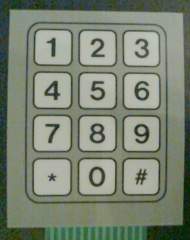
Numeric foil-keypad
Connection topology: 1x12
|
|
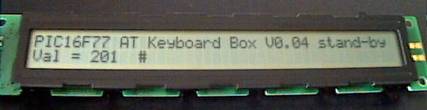
AT Keyboard Box V0.04 - Debug and
Calibration
Debug and calibration for
numeric foil-keypad on PIC16F77. Dedicated output on the
second line: Acquired A/D value from numeric foil-keypad
and corresponding symbol from look-up table (# has been
hit).
|
|
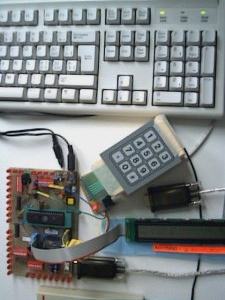
AT Keyboard Box V0.04 setup
with
numeric foil-keypad, dot matrix LCD display and AT
keyboard
|
|
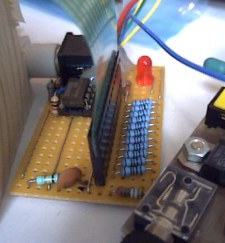
Interrupt generator
for numeric
foil-keypad: Whenever a key is hit, a key-specific analog
voltage is put on the first line to the A/D converter. At
the same time an interrupt is generated by this comparator
circuit and put on the second IRQ line.
|
|
|
|
|
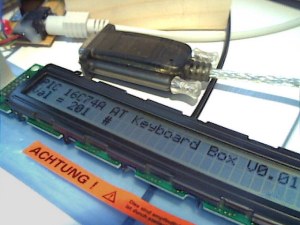
AT Keyboard Box V0.01
(initial
version with PIC16C74A)
|
|
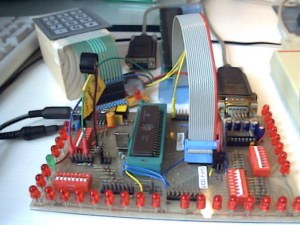
Front view
Microchip PIC16C74A
microcontroller and piezo-beeper on the left side.
|
|
|
|
|
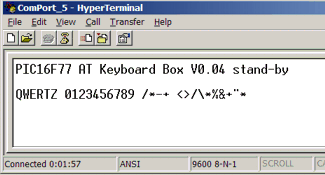
Screen shot of the HyperTerminal
Program
showing the start-up message of the
AT Keyboard Box V0.04
and some keyboard and keypad entries
|
How the numeric
foil-keypad works [Toc] [Top]
Here is the description of the additional small numeric
foil-keypad. The numeric foil-keypad is equipped with a specific
resistor cascade to decode the values through direct 8 bit A/D
conversion using the PIC-internal A/D converter. The advantage
is a very low pin usage: Only two pins are necessary for
proper detection and decoding of all keypad entries. One pin
provides the analog value, the other pin serves for interrupt
generation whenever a key of the keypad is touched. The interrupt
is used to start the A/D conversion.
During the interrupt service routine, only a short busy wait
(analog settling time) and the A/D conversion - using the
internal RC oscillator - is carried out. Before leaving the ISR,
the 8 bit A/D result is stored in a specific register and a
dedicated flag is set.
Decoding of the A/D value is done during normal operation
(activated by the flag) using two look-up tables. The first
look-up table (LUT1) contains the expected 8 bit values of the
keypad to check for valid entries. A numeric window of ±3
allows for slight analog deviations during matching. The matching
algorithm just scans the entire LUT1 until the received keypad
A/D result matches a LUT1 entry. The amount of loops carried out
in LUT1 determines the position of the corresponding
symbol/character in LUT2. At the end, RS232 transmission and LCD
display update are carried out.
Dynamic configuration of RS232 baud rate setting at start-up
(user-customization with 1200 baud - 115200 baud). A
watchdog timer implemented using TMR1 checks for inactivity
during the customization process. After 12 seconds of
inactivity, the user-customization process terminates with the
current setting. At power-up, the default setting is 9600 baud,
which will be configured after the time-out - unless no
user-customization takes place.
This setup works also without attached foil keypad, even if
the corresponding code is assembled and loaded into the
microcontroller.
Note that every change in
microprocessor clock frequency needs a re-calibration and/or
re-design of the analog foil-keypad decoding
circuitry. This means that the PIC microprocessor
clock frequency (related to the A/D conversion speed), output
drive strength of the keypad resistor cascade and both debounce
capacitors on IRQ line and analog value pin affect the proper
function of the keypad circuit. Whenever the PIC clock frequency
is changed, (slight) adaptations on the analog circuitry may have
to be expected.
Specifications [Toc] [Top]
| Processor: |
PIC16F77 (PIC16C74A) |
| Clock Frequency: |
14.745600 MHz (HS mode) |
| Throughput: |
3.7 MIPS |
| RS232 Baud Rate: |
Customizable by user (BRGH =
0),
any setting from 1200 baud - 115200 baud |
| Serial Output: |
default setup: 9600 baud, 8 bit,
no parity, 1 stopbit |
| Keyboard Routine Features: |
Capability of bi-directional
communication between controller and keyboard |
| Numeric Keypad Features: |
Interrupt-based acquisition,
direct 8 bit A/D conversion |
| Acquisition Methodology: |
Preemptive, interrupt-based
keyboard scan pattern acquisition, decoding to ASCII
characters during normal operation mode activated by ready
flag (including LCD display and RS232 activities) |
| Code Size of entire
Program: |
1231 instruction words |
| Required Hardware: |
AT keyboard, PS/2 connector,
MAX232 level shifter, dedicated foil-keypad, LM393 comparator
circuity for interrupt generation, HD44780 compatible dot
matrix LCD (2x16, 2x20 or 2x40 characters) |
| Optional Hardware: |
Piezo beeper with decoupling
capacitor |
| Required Software: |
RS232 terminal software (or
Excel 97 RS232 Debug Interface) |
Parts
order information [Toc] [Top]
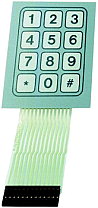 |
Numeric foil-keypad order information and technical
specifications:
www.conrad.de: FOLIENTASTATUR 1x12, Part-Nr.
709948-14 |
Project Resources [Toc] [Top]
Available
Microchip PIC Assembler Source Code [Toc] [Top]
| Main File |
Main Keyboard Decode Lookup
Table |
SHIFT Keyboard Decode Lookup
Table |
HEX Files |
Debug and
calibration version for numeric foil-keypad V0.04:
box_dbg.asm |
English 'codepage' (QWERTY)
View: eng_main.html
Download: eng_main.asm |
English 'codepage' (QWERTY)
View: eng_shif.html
Download: eng_shif.asm |
QWERTY 'codepage':
box_dbg_eng.hex
QWERTZ 'codepage':
box_dbg_sg.hex
|
Modified Swiss German 'codepage'
(QWERTZ)
View: ger_main.html
Download: ger_main.asm |
Modified Swiss German 'codepage'
(QWERTZ)
View: ger_shif.html
Download: ger_shif.asm |
The above programs need
additional include files (modules) to
get successfully assembled: m_bank.asm, m_wait.asm,
m_lcd_bf.asm
Important: Due to
bi-directional communication between controller and
keyboard as well as between controller and LCD display, the
above programs only work if both components are connected and
are working properly! |
Schematics, Data
Sheets and Pinout [Toc] [Top]
AT Keyboard
Specification (PDF, 189 kB)
The schematics of the AT Keyboard Box using the PIC16F77:
You don't know how a dot matrix LCD is working? Have a look at
my data sheets page.
Download ASCII Character Map: ASCII-Map.pdf
You can get the description of the various keyboard connectors
<here>.
Last updated: 2005/06/06
[Toc] [Top]